VoClone: AI Voice Changer
MoboverMusic & Audio
4.2519.00 Reviews
- Version
- 3.4.15
- Installs
- 100.00K
- Age Rating
- Everyone
Screenshots
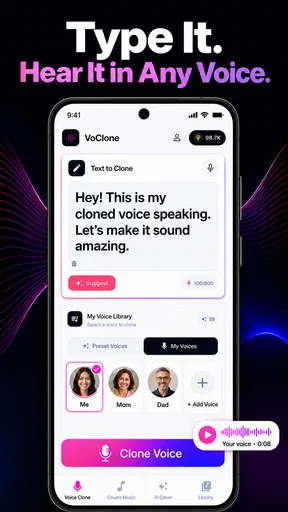
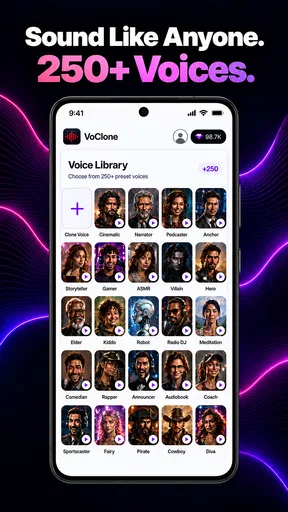
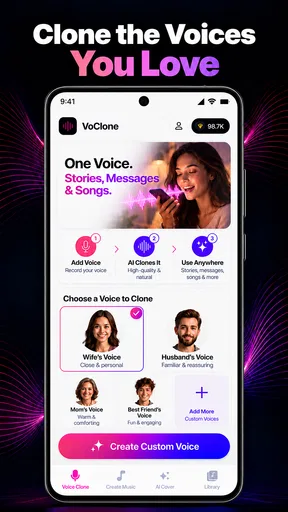
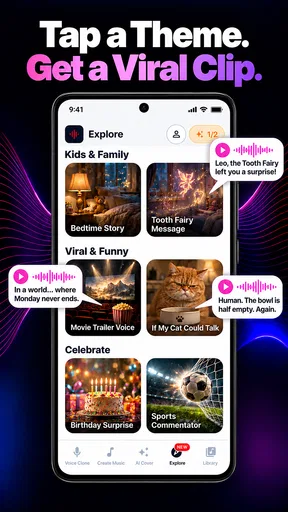
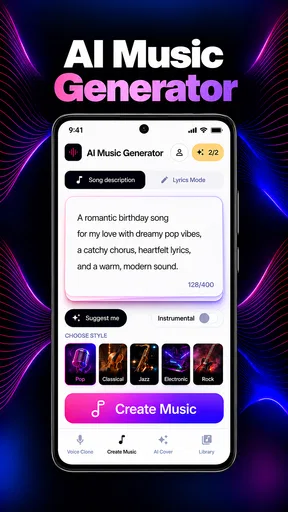
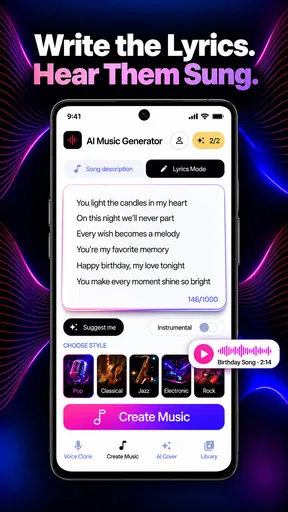
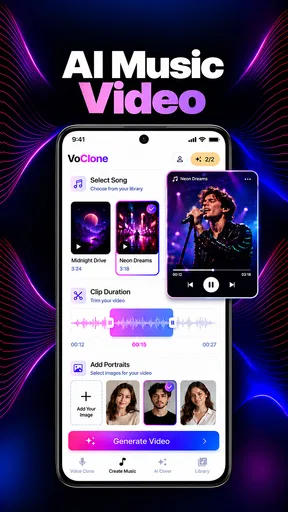
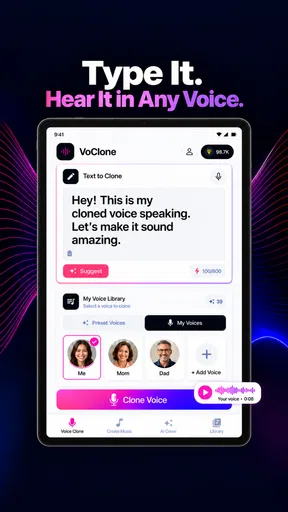
Our Review of VoClone: AI Voice Changer
 Analysis by Appyee
I spent time with VoClone: AI Voice Changer as a music and audio app, and my first impression is that it is aimed at people who want to experiment rather than simply play music. Its central idea is turning written words and recorded material into creative voice projects, including AI covers, song ideas, and voice changes. That makes it more interesting than a standard soundboard, but also means the quality of the result depends heavily on how carefully you prepare the source material.
Developed by Mobover, VoClone: AI Voice Changer is free to install and is rated for Everyone. It has reached over one hundred thousand installs and holds a 4.2 average from around three thousand seven hundred ratings, with roughly five hundred reviews. Those figures suggest that the app has found a real audience, although they do not tell me that every voice conversion will sound equally convincing. AI audio tools can be impressive in one project and noticeably artificial in another.
How VoClone fits into everyday music creation
The most useful way to think about this app is as a quick idea generator. I would not approach it as a replacement for a full digital audio workstation, a professional vocal booth, or a dedicated music streaming service. Instead, it gives you a playful route from an idea in your head to a rough vocal performance or a shareable audio experiment.
The workflow is especially appealing when you have lyrics but no singer, a melody but no suitable voice, or a short joke that would be fun in an unexpected vocal style. Typing text can be faster than recording yourself, while voice-changing tools can help you try a different character without setting up microphones or editing software. That convenience is the app’s main attraction.
In practice, I found that the best results come from treating each generation as a draft. Shorter lines are easier to judge than a long block of text, and clear wording gives the system less room to misread the intended rhythm. If a phrase sounds awkward, changing the punctuation or splitting the line can be more effective than repeatedly pressing generate with exactly the same input.
What the free entry point really means
VoClone costs nothing to install, which makes it easy to test before deciding whether it belongs in your regular creative routine. That free access matters because AI audio apps can be difficult to evaluate from screenshots alone. You need to hear how the voices handle your own lyrics, pronunciation, timing, and preferred style.
The app also contains in-app purchases ranging from $4.99 to $99.99 per item. That is a broad spread, so I would avoid assuming that installing the app gives unlimited access to every creation option. The sensible approach is to begin with the free experience, learn which tools you actually use, and only then consider whether a paid item solves a specific problem for you.
For casual users, the free starting point may be enough for occasional experiments. For someone creating frequently, the value depends on how much access the paid options provide and how often the resulting audio is genuinely useful. I would not pay simply because a generated clip sounds impressive once. I would pay only after testing several different prompts and confirming that the output fits my workflow.
There is another practical point: a low purchase price can still be poor value if you generate many throwaway attempts before getting one usable result. With AI voice tools, the real cost is not only money. It is also time spent rewriting lyrics, correcting pronunciation, and comparing variations. VoClone is most economical when you approach it with a clear purpose instead of generating endlessly.
Where the app delivers the most value
The strongest use case is quick musical exploration. Suppose I have a chorus written in my notes during a commute. I can use the text-to-voice approach to hear whether the syllables fit the idea before opening a larger music program. Even if the result is not a finished song, it can reveal that a line is too long, a rhyme feels forced, or the hook becomes more memorable when repeated.
AI covers offer a different kind of value. They are useful for imagining how a familiar song might feel with another vocal character, or for creating a playful version to share privately with friends. I see this as an experimentation tool rather than a substitute for an original singer. The appeal is the comparison: the same musical idea can take on a different mood when the vocal identity changes.
Voice cloning and voice-changing features can also help with character work. A hobbyist making a short video, a tabletop gaming group preparing an audio scene, or a creator testing dialogue for a concept may appreciate hearing lines delivered in a transformed voice. The advantage is speed. You can test the emotional direction of a scene without asking another person to record every variation.
A less obvious workflow is to use the app before recording a real vocalist. I would first prepare several lyric versions, generate rough vocal references, and listen for phrasing problems. Then I would give the strongest version to the singer as a guide, while keeping the human performance as the final creative choice. This separates songwriting decisions from performance decisions and can save rehearsal time.
Another useful approach is making alternate drafts rather than trying to perfect one generation. Create a plain version first, identify the words that sound unclear, and revise only those sections. This is more controlled than changing the whole lyric after every result. It also makes it easier to compare whether a problem comes from the wording or from the selected voice treatment.
Important limits before you rely on it
The first limitation is consistency. A voice that sounds convincing on a short phrase may become less natural across a longer lyric. Pronunciation, emphasis, and emotional delivery can vary, so I would listen closely before sharing anything as if it were a polished performance. The app is better suited to drafts, novelty clips, and creative tests than to work that demands exact vocal control.
Timing is another possible source of friction. Written text does not always communicate the rhythm you hear in your head. Punctuation may influence phrasing, but it cannot replace detailed musical editing. If you need precise control over every beat, breath, harmony, or syllable, a traditional recording and editing setup will give you more dependable control.
There is also a creative trade-off in using a generated voice. The speed is attractive, but the result may feel less personal than a real performance. For a humorous clip, that artificial quality can be part of the charm. For an intimate song or a serious vocal project, it may become the main reason to choose another method.
I would also be careful about how I use recognizable voices and source material. The app’s creative tools make experimentation easy, but that does not automatically make every use appropriate. I would keep projects respectful, avoid presenting generated performances as authentic recordings, and think about permission whenever a real person’s identity or work is involved.
The interface may feel more approachable than a full audio workstation, but simplicity has a cost. You get fewer opportunities to fine-tune a result than you would in specialist software. That is good when I want a quick idea and frustrating when I want to repair one badly pronounced word without regenerating a larger section.
Who should try it first
VoClone is a good fit for curious music fans who enjoy testing unusual vocal ideas. It is also worth considering for beginner songwriters who want to hear lyrics aloud before committing to a melody. Because the app is free to install, those users can explore the basic experience without making an immediate purchase decision.
Content creators may find it helpful for producing temporary voice concepts, short musical jokes, or character-driven audio drafts. I would use it during planning rather than assume every output is ready for publication. A generated clip can show whether an idea works, while final editing and creative judgment still belong elsewhere when quality matters.
It may suit teachers or parents looking for a playful way to make language and music exercises more engaging, but the Everyone rating should not be interpreted as a guarantee that every generated result is appropriate for every situation. I would still listen to anything before sharing it with children or using it in a classroom.
The app is less suitable for a vocalist who needs exact control, a producer who expects multitrack editing, or anyone searching primarily for a large music library. Those users would probably be happier with recording software, a conventional vocal-effects app, or a streaming service, depending on the goal. VoClone’s strength is transformation and ideation, not comprehensive studio production.
I would also skip it if I only want to change my voice during live calls or games. The app’s focus is music and generated audio creation, so a dedicated real-time voice changer may be a better match for that specific situation. Choosing the right category matters more than choosing the most interesting feature list.
A realistic way to use it during a busy day
Imagine that I am preparing a short birthday video for a friend. I have written a few lines but cannot decide whether they work as a spoken message or a song. I could enter the text, listen to a generated version, and use the result to identify the strongest phrase. Then I might shorten the weaker lines, try a different vocal treatment, and use the app’s output as a private concept before recording my own final message.
This scenario shows both the benefit and the boundary. VoClone helps me move from a blank page to something audible in a short session. It does not remove the need to edit the words, check the tone, or decide whether the final piece should use a generated voice at all. The app accelerates the first creative step; it does not make every later step unnecessary.
For songwriting, I would keep a small notebook of prompts and lyric fragments rather than entering random text each time. Grouping ideas by mood or subject makes the results easier to compare. I would also save the wording that produces a useful rhythm, because the exact phrasing can matter as much as the selected voice.
Version, compatibility, and day-to-day expectations
The current version is 3.4.15, and the app runs on Android 7.0 or later. That gives it a relatively broad reach for Android users with older devices, although audio generation can still feel more comfortable on a newer phone with a stable connection and enough free space for working with media. I would update before judging the experience, especially with an AI audio app where improvements may affect generation behavior.
Mobover has positioned this as a dedicated music and audio app rather than a general-purpose editor. That focus is helpful because the main path is easy to understand: start with a voice or text idea, create an audio result, and decide whether it is worth refining. At the same time, anyone expecting the layered controls of a professional editor should adjust expectations before installing.
The store summary describes voice cloning, AI covers, song creation, and turning text into different voices. I found those functions most valuable when used in combination rather than isolation. Text-to-voice can test lyrics, voice transformation can explore character, and cover-style experiments can provide a quick reference for mood. The app becomes less interesting when treated as a one-button novelty.
My buying judgment after testing the concept
The free installation makes VoClone easy to recommend as an experiment, especially for people who already have a clear reason to try AI voice creation. I would not describe the paid options as automatically good value for everyone, because the available purchase range is wide and the usefulness depends on how often you create audio. The right question is not whether the app can produce a striking clip, but whether it repeatedly helps you finish or improve a project.
My advice is to test three kinds of material before spending anything: a short lyric with simple pronunciation, a more expressive passage, and a practical voice-over sentence. If all three behave well enough for your intended use, paid access may make sense. If only the novelty sample works, keep the app free and treat it as a toy rather than a core tool.
My verdict: try it free if you want fast AI music experiments, but skip paid purchases unless the output solves a repeated problem. VoClone is at its best as a creative sketchpad for covers, lyrics, character voices, and rough song concepts. It is not the right choice for precise studio production, live voice effects, or anyone who wants a human performance without an artificial edge.
In the end, I would recommend it to a friend who enjoys trying new audio ideas and understands that the first result is usually a starting point. The app gives you a quick way to hear possibilities that might otherwise stay in your head. Just keep your expectations realistic, review every generated clip, and spend money only after the free experience proves that it belongs in your personal workflow.
Verdict
Strengths of VoClone: AI Voice Changer
- Offers many AI voice styles for calls, videos, and creative projects.
- Voice effects are easy to preview and apply, even for beginners.
- Useful for adding character to short clips, messages, and social content.
- Compact interface makes the main tools quick to find and use.
- Can provide entertaining results without requiring advanced audio-editing skills.
Limitations of VoClone: AI Voice Changer
- The most convincing voices may be locked behind a paid subscription.
- Output quality can vary noticeably depending on the source recording.
- Some effects may sound artificial or repetitive after extended use.
- Voice-changing features may require an internet connection to process audio.
- Users should review privacy terms before uploading personal voice recordings.
Similar Picks in This Category
View All
YouTube Music
Google LLC4.4

Samsung Music
Samsung Electronics Co., Ltd.3.8

Spotify: Music and Podcasts
Spotify AB4.3

JioSaavn - Music & Podcasts
Saavn Media Limited4.3

Lark Player:Music Player & MP3
Lark Player Studio - Music, MP3 & Video Player4.6

StarMaker: Sing Karaoke Songs
SKYWORK AI PTE. LTD.4.3
Frequently Asked Questions
What is VoClone: AI Voice Changer and what can it do?
VoClone: AI Voice Changer is an entertainment and audio-editing app designed to transform recorded or imported speech into different AI-generated voices. Depending on the available tools and voice library, you may be able to create character-style effects, adjust the sound of your voice, and prepare clips for sharing. It is mainly intended for casual content creation, jokes, gaming, and social media—not professional voice replacement without further editing.
How do I use VoClone: AI Voice Changer?
After opening the app, you generally record a voice clip or import compatible audio, select one of the available voice effects, and process the recording. The conversion may take a few moments, especially when it relies on online AI processing. Once the result is ready, you can listen to it, compare it with the original, and save or share the finished clip if those options are supported on your device and account.
Is VoClone: AI Voice Changer free to download and use?
The app may be available to download at no initial cost, but some voices, processing options, exports, or advanced tools can require in-app purchases or a subscription. Advertising may also appear in the free version. Before confirming a purchase, check the current pricing, renewal terms, trial conditions, and cancellation instructions shown in the relevant Google Play Store or Apple App Store listing.
Does VoClone: AI Voice Changer work offline?
Basic recording features may work without an internet connection, but AI voice conversion often requires communication with the app’s processing service. As a result, the quality and availability of transformations can depend on a stable connection. Offline functionality may also be limited by the version installed, the selected effect, and whether the voice model has already been downloaded to your device.
Is it safe and legal to use voices created with VoClone?
Use the app responsibly and only process audio that you own or have permission to use. Avoid impersonating real people, creating misleading recordings, or using another person’s voice for fraud, harassment, or unauthorized commercial content. You should also review the app’s privacy policy before uploading recordings, because voice samples may be processed online. Laws and platform rules concerning AI-generated voices vary by location.
